
Introduction
SRE handles calls in a data-driven way: the service provider defines its own data model, writes the service logic once against that model, and the data then determines the behaviour for each customer, number or call. The SRE Product Description explains the rationale for this approach and compares it with the configuration-based approach of most network equipment.
This document describes how data-driven call handling works in practice: how to design a service in this way, the Data Model Editor, the provisioning interfaces, the dual database and the service logic nodes that use the data. It ends with a SIP trunking example.
Principles
Separating Logic and Data
The first step in designing a service is to decide what belongs in the service logic and what belongs in the data:
- The service logic contains what is common to all customers of the service: the sequence of checks, the decisions and the way calls are routed.
- The data contains what differs between customers, numbers or calls: limits, options, number ranges, destinations and routes.
A simple rule applies: if a value or a choice can differ between two customers of the same service, it belongs in the data. A service logic that contains customer names, phone numbers or IP addresses is a sign that data has ended up in the logic, and that the logic will have to be changed for every new customer.
Changing the Logic or the Data
The service logic and the data follow separate life cycles in SRE:
- A service logic change is made in the Service Logic Editor, validated with the simulation tools against the saved test cases, and released as a new version. The previous version remains available for rollback.
- A data change is made through the GUI, the REST API or CSV files in the master database on the Element Manager. It is replicated to the local copy of each Call Processor and applies to subsequent calls, without any release.
Logic changes are rare and made by service designers. Data changes are frequent and mostly made by the OSS/BSS. The data model itself has a third life cycle, described in Evolving the Data Model.
Modelling Options and Variants
A few patterns keep the service logic stable as the offers evolve:
- Options as columns. Each service option is a column, such as international calls allowed, recording enabled or fallback number. Introducing a new option means adding a column, with a default value for existing records, and a branch in the service logic, once. Enabling it for a customer is then a data update.
- Offers as tables. Rather than setting every option on every customer, options are grouped in an Offer or Profile table that customers reference. Changing an offer applies to all its customers at once, while customer columns can still override specific values.
- Variants as sub-logics. When customers need genuinely different call flows, each variant is built as a sub-logic and a column indicates which one applies. The sub-logic to execute is selected at runtime from the data.
Designing the Data Model
Your Model, Not the Vendor's
SRE has no predefined schema. Using the Data Model Editor, the service provider designs the data model that matches its own business and provisioning processes. The concepts the operator already uses (Customer, Contract, Number Range, Site, Service, Partner, and so on) become the data model of SRE.
Several independent data models can be defined on the same platform, each stored in its own database. This allows, for example, separating the data of different services or business units, each with its own access rights and life cycle.
Tables, Columns and Relationships
A data model is made of tables and their columns. For each column, the service provider defines:
- The type: text, integer, float, boolean, date/time or UUID.
- Relationships: a column can reference a record of another table (foreign key), for example linking a phone number to its customer. Relationships are enforced by the database, and are followed automatically by the GUI, the CSV interfaces and the service logic.
- Constraints: nullable or mandatory, default value, unique values.
- Indexes: single-column or multi-column, unique or not, to keep lookups fast on large tables.
- Validators: checks applied when data is provisioned, such as regular expressions, value lists, numeric ranges, date formats or IPv4/IPv6 addresses. Invalid data is rejected before it reaches the database, whatever the provisioning interface.
- Presentation options: label, multi-line text field, hidden column.
For every record, SRE also keeps track of who created or last modified it, and when.
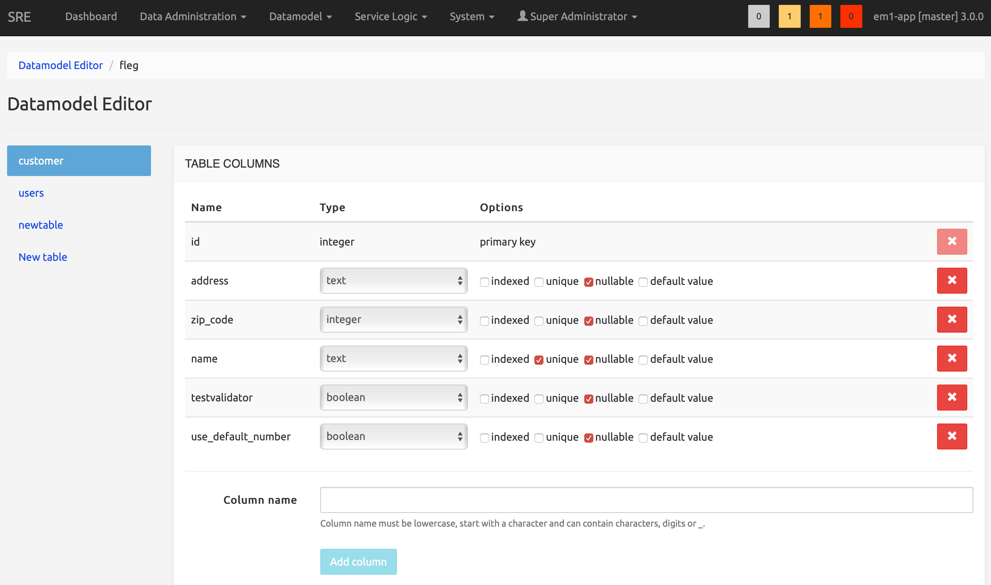
A data model definition can be exported and imported, for example to move it from a lab platform to production, and its diagram can be exported for documentation purposes.
Evolving the Data Model
The data model evolves with the business. Every saved definition becomes a new version. When a version is activated, SRE computes the changes compared to the version currently in use (new tables, new or renamed columns, new constraints, indexes or relationships) and applies them to the database while keeping the existing data. The list of changes is presented to the user and recorded in the data model history.
Before an activation, the data can be backed up from the GUI. Backups are listed per data model version and can be restored if needed. SRE warns the user when the active data model has no recent backup.
Provisioning the Data
Interfaces Generated Automatically
Once a data model version is activated, all provisioning interfaces adapt to it, without any development:
- GUI: screens to browse, search, create, modify and delete records are generated for every table, including drop-down lists for relationships.
- REST API: every table is exposed through the provisioning API, supporting GET, POST, PUT and DELETE operations. The OSS/BSS provisions SRE directly with the data it already holds, in its own structure.
- CSV import, export and removal: enabled per table for bulk operations. Processors can be applied to the CSV fields, for example to convert date formats, treat empty fields as NULL or resolve a relationship from a readable value (a customer name instead of an internal identifier).
The validators defined in the data model are applied on all interfaces.
Access Control
Role-based access control applies to the data as well. Each user role defines which data models and tables are visible and whether they can be modified. This allows, for example, giving a partner or a customer care team access to their own tables only.
Dual Database
Each data model comes with two databases, called side A and side B. One side is active and used for call processing, while the other side is on standby.
The GUI, the CSV provisioning and the REST API can each be pointed independently to the active or the standby side. This makes the following scenarios possible without any impact on live traffic:
- Loading or restructuring a large quantity of data on the standby side, then switching it to active once it is complete and verified.
- Testing a new OSS/BSS integration against the standby side through the REST API.
- Activating and validating a new data model version on the standby side before using it for call processing.
If an issue is found after a switch, the previous side is still available.
Using the Data in the Service Logic
The service logic accesses the data through dedicated nodes:
- Database query: retrieves records with filters, joins between related tables, grouping, aggregation and sorting. Joins between tables linked by a relationship are resolved automatically.
- Raw SQL query: for advanced cases that cannot be expressed with the standard query node.
- Create, update and delete records: the service logic can also write data, for example to store a state, a counter or the result of an external lookup.
- List of records operations: filtering, sorting, extracting, shuffling or rotating the records returned by a query, for example to implement load sharing or least cost routing across several routes.
- Caching: results can be cached to reduce database load on high-traffic services.
The same approach applies to external data sources. Data held in other systems is queried via HTTP, SOAP, ENUM/DNS, Diameter, LDAP or MongoDB, and combined with the internal data in the same service logic.
Example: SIP Trunking
A service provider offers SIP trunking to business customers. It designs the following data model:
| Table | Main columns |
|---|---|
| Customer | name, status (active, suspended, bad payer), maximum simultaneous calls, international calls allowed |
| Trunk | customer, SBC address, primary or backup |
| Number Range | customer, first number, last number |
The service logic is designed once:
- Identify the trunk the call comes from and retrieve the related customer.
- Reject the call if the customer is suspended or flagged as a bad payer.
- Check that the calling number belongs to one of the customer's number ranges, otherwise reject or correct it.
- Check the number of active calls against the customer's maximum.
- Reject international destinations if the customer is not allowed to call them.
- Route the call, falling back to the backup trunk if the primary one fails.
Onboarding a new customer then means creating one customer record, its trunks and its number ranges, usually through the REST API from the order management system. Raising a customer's call limit, suspending it or allowing international calls is a single update, effective on the next call.
When the service provider later introduces a new option, such as call recording, it adds a column to the Customer table and a branch to the service logic. The option is then enabled per customer by provisioning, like any other data.