
Introduction
The following procedure describes in general terms the approach to prepare and restart EM and CP elements within a SRE cluster in order to update monthly security patches for the underlying OS
Applicable release
This MOP applies to the Current load of
Change Freeze
No freeze necessary
Prerequisites
Prior to the upgrade the following prerequisites are required:
- Should be performed in a change window
Overview
Process Management
SRE software processes are controlled by the supervisord daemon. The systemctl service name to start, stop and request status of the SRE software is sre.
Besides these standard service operations, it is possible to connect directly to the running supervisord instance by launching directly /opt/sre/bin/supervisorctl. Once connected to supervisord, several commands are available, as shown with the help command.
supervisor> help
default commands (type help <topic>):
=====================================
add exit open reload restart start tail
avail fg pid remove shutdown status update
clear maintail quit reread signal stop version
The current status of the processes can be obtained by using the status command.
supervisor> status
sre-REST STOPPED Not started
sre-call-processor:0 RUNNING pid 6671, uptime 0:48:58
sre-gui STOPPED Not started
sre-manager STOPPED Not started
The current status can also be obtained by looking at the SRE GUI Dashboard, as described in the procedure section below.
On start, supervisord reads its configuration file /opt/sre/etc/supervisord-program.conf to select which programs must be started. It is possible to overrule this configuration by manually starting or stopping processes.
A single process can be restarted with the restart program command.
supervisor> restart sre-manager
sre-manager: stopped
sre-manager: started
A single process can be stopped with the stop program command.
supervisor> stop sre-manager
sre-manager: stopped
A single process can be started with the start program command.
supervisor> start sre-manager
sre-manager: started
The supervisord configuration can be reloaded with the reload command. This operation stops all the processes and they are restarted according to the supervisord configuration file. In particular, if a process has been manually started while it is not active in the configuration, this process will not start after the reload operation.
Offload traffic CPs
If Postgres database failover enabled (the default), it's better to temporarily disable it and enable it again during SO upgrades. To check if it's enabled (as Postgres user, on master EM):
[postgres@sre-41-em2 ~]$ /usr/pgsql-14/bin/repmgr service status
 ID | Name      | Role    | Status    | Upstream  | repmgrd | PID     | Paused? | Upstream last seen
----+-----------+---------+-----------+-----------+---------+---------+---------+--------------------
 1  | sre41-em1 | standby |   running | sre41-em2 | running | 2215364 | no      | 32 second(s) ago
 2  | sre41-em2 | primary | * running |           | running | 349752  | no      | n/a
 3  | sre41-cp1 | standby |   running | sre41-em2 | running | 626080  | no      | 44 second(s) ago
 4  | sre41-cp2 | standby |   running | sre41-em2 | running | 2615380 | no      | 6 second(s) ago
Paused no means automatic failover enabled. Paused yes means automatic failover disabled.
To disable it globally (as Postgres user, on master EM):
[postgres@sre-41-em2 ~]$ /usr/pgsql-14/bin/repmgr service pause
To enable it globally (as Postgres user, on master EM):
[postgres@sre-41-em2 ~]$ /usr/pgsql-14/bin/repmgr service unpause
Procedure CP
- Login to CP1 via SSH
- Launch supervisorctl
/opt/sre/bin/supervisorctl - List the status of the processes:
supervisor> status - Copy status for later comparison
- STOP MONGODB
[root@sre-cp1 ~]# systemctl stop mongod - STOP KAMAILIO
[root@sre-cp1 ~]# systemctl stop kamailio - STOP SRE
[root@sre-cp1 ~]# systemctl stop sre - Perform monthly security update
- START SRE
[root@sre-cp1 ~]# systemctl start sre - List the status of the processes:
supervisor> status - Check against previous list
- If any differences occur start the required daemon manually
- Check via the GUI that traffic is being processed
- Perform the same on CP2
Procedure EM
- Login to EM1 via GUI
- Check which device is standby:
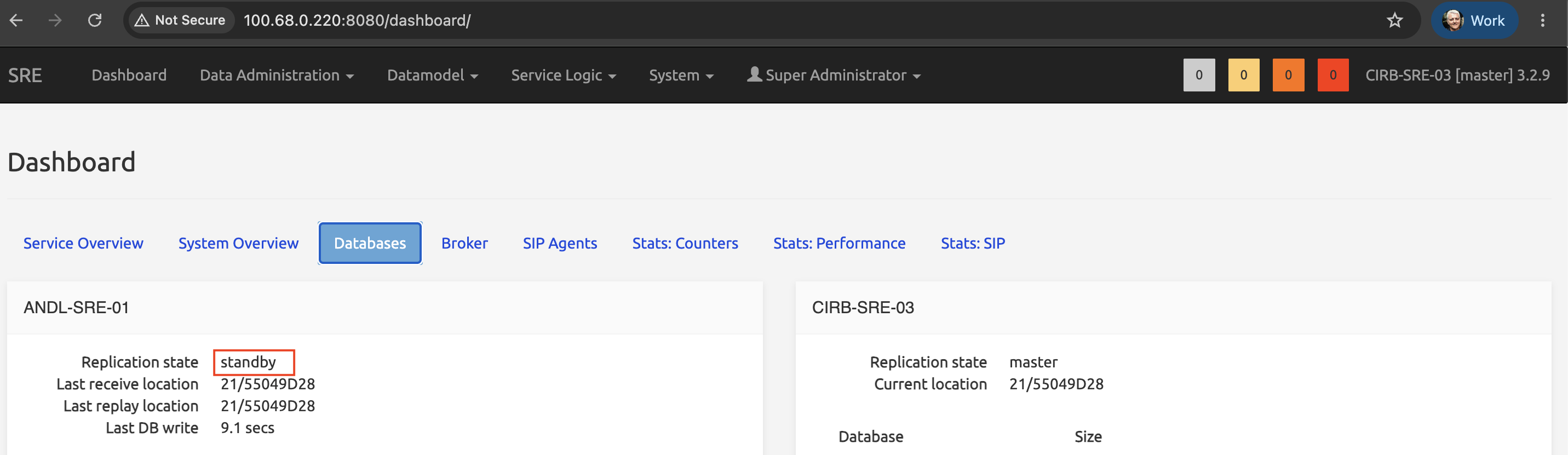
NB: DB synchronization numbers match Standby and Master
- Login to the standby EM via SSH
- Launch supervisorctl
/opt/sre/bin/supervisorctl - List the status of the processes:
supervisor> status - Copy status for later comparison
- STOP MONGODB
[root@sre-cp1 ~]# systemctl stop mongod - STOP KAMAILIO
[root@sre-cp1 ~]# systemctl stop kamailio - STOP INFLUXDB
[root@sre-cp1 ~]# systemctl stop influx - STOP POSTgreSQL
[root@sre-cp1 ~]# systemctl stop postgresql-14 - STOP SRE
[root@sre-cp1 ~]# systemctl stop sre - Perform monthly security update
- START SRE
[root@sre-cp1 ~]# systemctl start sre - List the status of the processes:
supervisor> status - Check against previous list
- If any differences occur start the required daemon manually
- Check via the GUI that the DB synchronization is up to date
- Perform the same on CP2