
Introduction
SRE integrates with web applications in both directions. It exposes HTTP APIs whose behaviour is defined by service logic, it calls external HTTP and SOAP APIs from any service logic, and it keeps WebSocket connections open to external platforms so that it can react to the events they send. The SRE Product Description explains why these integrations matter and how they fit in the overall platform.
This document describes how each part works in practice: the HTTP interface and its custom endpoints, the nodes used to secure an exposed API, the nodes used to consume external APIs, the WebSocket processor and the provisioning REST API. It ends with a partner-facing number lookup example.
Exposing APIs: the HTTP Interface
How a Request Is Handled
Each Call Processor can run an HTTP interface next to its SIP and ENUM interfaces. When an HTTP request arrives, SRE executes a service logic and returns the response it builds. The API is designed in the Service Logic Editor like any call flow, with access to the same database, external queries and other nodes.
The request is made available to the service logic as variables:
- Method and path: the HTTP method, the full path and each path segment separately.
- Query string parameters: each parameter becomes a variable with the same name.
- Body: for PUT, POST and PATCH requests with a JSON content type, the body is available as a JSON object, ready for the JSON nodes described in Working with JSON and XML.
- Headers: all request headers, as a list of records with a name and a value.
- Access token: the bearer token from the Authorization header, if present.
The response is built by the HTTP response node, which sets the HTTP status code, the content type, custom response headers and the body.
The HTTP interface can be served over HTTPS by enabling SSL in the HTTP processing settings.
Custom Endpoints
By default, all HTTP requests are handled by the service logic selected for the HTTP interface. Custom endpoints route specific requests to dedicated service logics. A custom endpoint is defined by an HTTP method (GET, PUT, POST, PATCH or DELETE) and a URL. The URL can contain named parameters in braces, such as /numbers/{number}; the value found in the request path is then available to the service logic as a variable with that name.
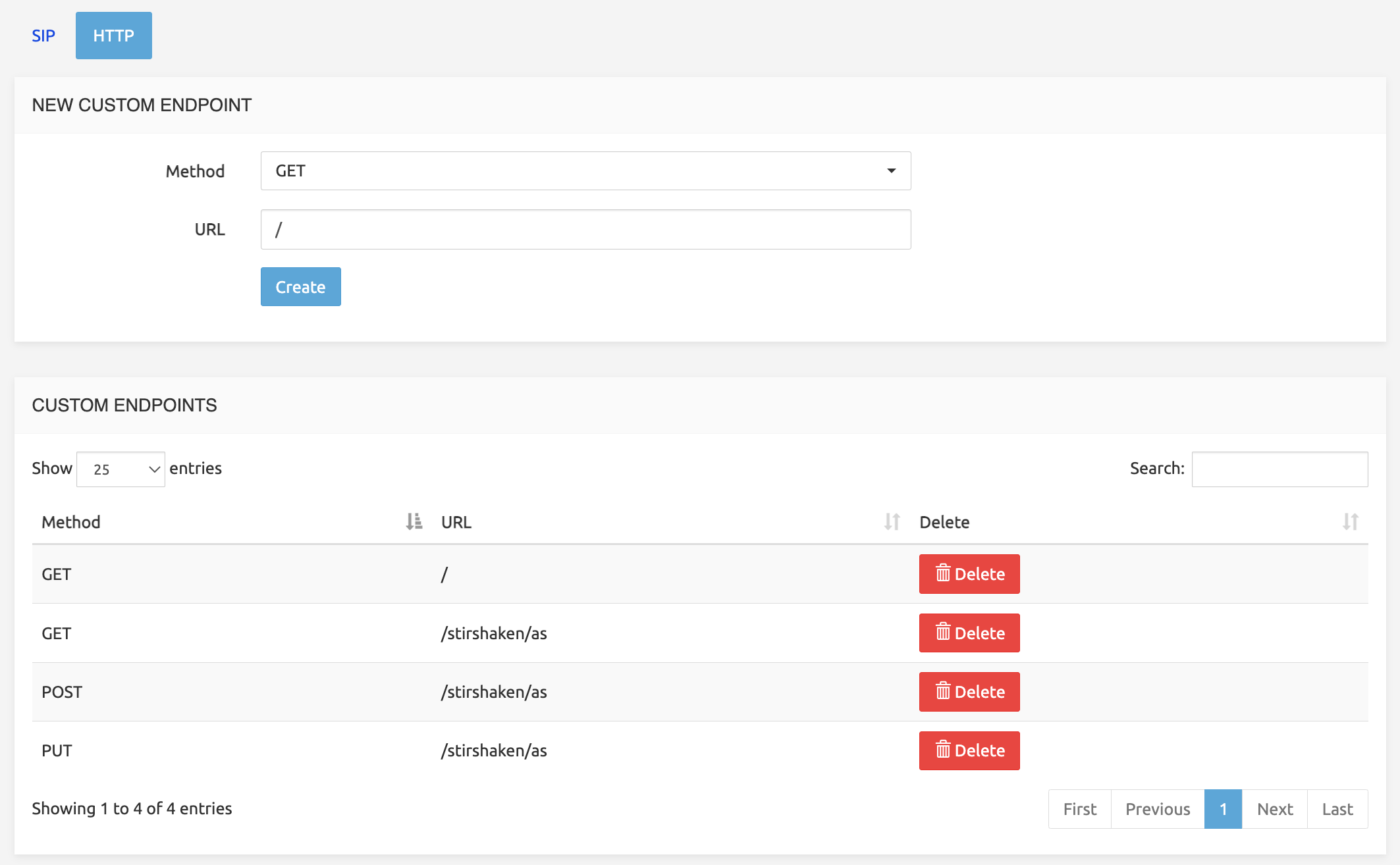
Each custom endpoint appears in the Service Selection page, where the active service logic version is chosen for it, exactly as for the SIP and ENUM interfaces. A new version of an API is therefore released, and rolled back if needed, by selecting another service logic version. A different version can also be selected on specific Call Processors through the node override, for example to try a new API version on one node first.
A request that matches no custom endpoint is handled by the default HTTP service logic. If no service logic is found at all, SRE answers 404 Not Found.
Licensing and Throttling
Exposing HTTP endpoints requires the SRE HTTP License (SRE-LIC-HTTP), expressed in requests per second. The licence is enforced per Call Processor over burstable 10-second windows.
Operations
HTTP requests are covered by the same operational tools as calls:
- Simulation: the Simulate HTTP tab of the Service Logic Editor runs a service logic with a given method, path and body, and shows each step and variable value.
- Tracing: detailed traces can be enabled for requests whose URL matches a regular expression.
- Logs and statistics: each request is summarised in the call summary log with its input, the nodes executed, the output and the duration. Request and response counters, per method and per status code, are available in the statistics dashboards.
- CDRs: when HTTP CDRs are enabled, a CDR is produced for every request, with the method, URL, response code and source address. The service logic can add its own fields to the CDR.
The AdminGuide and the ServiceLogicEditor guide describe these tools in detail.
Securing Exposed APIs
Securing an API is part of its service logic: the checks are nodes, and their success or failure branches lead to the normal processing or to an error response such as 401 or 403.
| Node | What it does |
|---|---|
| Check access token | Verifies that the access token of the request is a token generated in SRE (System > Access Tokens) and, optionally, that the token has read or edit rights on given data model tables. |
| Validate JSON schema | Checks a JSON object, such as the request body, against a JSON schema, so that malformed requests are rejected before any processing. |
Consuming External APIs
HTTP Request Nodes
Three nodes send HTTP requests to external systems:
- HTTP JSON request: sends a request to a JSON API and stores selected values of the response in variables, using JSON paths.
- HTTP XML request: sends a request to an XML API and stores selected values using XPath expressions. The whole response can also be converted into a JSON object.
- HTTP generic request: sends a request and stores the raw response in a variable, for any other content type.
All three share the same options:
- Method and URL: GET, PUT, POST, PATCH or DELETE. The URL can contain variables.
- Headers: any request header, with values taken from variables, for example an API key or a bearer token.
- Body: built with the Jinja2 templating language from the variables of the service logic.
- Authentication: username and password (basic or digest authentication).
- TLS: certificate verification, which can be disabled for lab systems, and mutual TLS with a client certificate, client key (optionally protected by a password) and CA certificate (since SRE 4.0).
- Response headers: the value of response headers can be stored in variables (since SRE 4.2).
- Branches: success, specific HTTP status codes, any other non-2xx status, timeout and failure each lead to their own branch, so that every outcome is handled explicitly in the service logic.
Timeouts, Keep-Alive and Cooldown
Each request has a timeout, 30 seconds unless configured otherwise in the node. Since SRE 4.1, two options keep the service responsive when external systems are slow or unavailable:
- Keep-alive: the TCP connection to the external server stays open and is reused by subsequent requests, which avoids a new connection, and possibly a TLS handshake, for every call.
- Cooldown: after three timeouts towards a server, the node stops sending requests for the configured period (10, 30 or 60 seconds) and directly follows the timeout branch. The service logic continues immediately, for example with a fallback route, instead of waiting for a timeout on every call.
Caching
Successful responses can be cached by the node for a period from 5 seconds to 60 minutes. A request with the same URL and body is then answered from the cache without calling the external system, which reduces latency and the load on the external API. For data that must be shared by all Call Processors, the Set cached data and Get cached data nodes store values with a time-to-live in a MongoDB database.
SOAP
Two nodes call SOAP web services:
- SOAP request: SRE reads the service's WSDL and builds the request for the selected method from XML paths and values, including SOAP headers. Repeated elements can be generated from a list held in a JSON object.
- SOAP raw XML request: the complete SOAP envelope is written as a Jinja2 template, for services where full control over the XML is needed.
In both cases the response is stored as a JSON object, with XML namespaces removed, and processed with the JSON nodes.
Working with JSON and XML
The responses of external APIs and the bodies of incoming requests are processed with the same nodes:
- Extract JSON path: extracts one or more values from a JSON object, either the first match or all matches as a list.
- Extract XPath (since SRE 4.2): extracts values from an XML document, with namespace mappings, either the first match or all matches as a list of records.
- Create JSON object: builds a JSON object from a Jinja2 template, for example a request body or an API response.
- Validate JSON schema: checks a JSON object against a schema.
Event-Driven Integration: WebSocket
Since SRE 4.2, a WebSocket processor runs on the Call Processor. It lets SRE open WebSocket connections to external platforms and react to the messages they send, for example to follow the events of a real-time AI voice agent (see the SRE and AI feature description).
The connection is opened from any service logic with the Connect WebSocket node, which defines:
- the URL of the remote platform and optional connection headers, for example for authentication;
- an identifier, chosen by the service logic, for example a call identifier;
- the variables to pass, which are copied from the current service logic;
- a timeout: the connection is closed if no message is received within this time (120 seconds by default).
The connection then lives independently of the service logic that opened it. Once it is established, and then for each incoming message, SRE executes the service logic selected for the WebSocket processing interface. This service logic receives the connection identifier, the passed variables and the message, as a JSON object when the message is valid JSON and as text otherwise. The first execution receives a "connected" message.
In this service logic, the Send WebSocket message node sends a message on the connection and the Disconnect WebSocket node closes it. All other nodes are available, so an incoming event can trigger a database query, an HTTP request or an update of the call.
A dedicated simulation tab in the Service Logic Editor tests this service logic with sample messages, and traces can be enabled per connection identifier.
Provisioning REST API
Besides the APIs defined by service logic, SRE provides a native REST API to provision the internal database. It is generated from the active data model and supports GET, POST, PUT and DELETE on every table, with basic authentication or access tokens. Its principles are described in the Data-Driven Call Handling feature description, and its use in the RestApi guide.
The provisioning REST API operates on individual records, following the data model. The HTTP interface executes service logic, so it can, for example, update several tables and an external system in one request.
Example: Partner Number Lookup API
A service provider wants to let partners check, for a phone number, whether it is active and which customer and route it belongs to. The data is already in SRE's internal database, in a Number Range table linked to a Customer table.
The service provider creates a custom endpoint GET /lookup/{number} and a service logic with the following steps:
- Check access token: verify the partner's token and its read right on the Number Range table. On failure, an HTTP response node answers 401.
- Regular expression match: check that the
numbervariable taken from the URL is a valid number. Otherwise, answer 400. - Database query: find the number range that contains the number and retrieve the related customer. If no record is found, answer 404.
- Create JSON object: build the response body, for example
{"number": "...", "status": "active", "customer": "..."}. - HTTP response: answer 200 with content type
application/jsonand the JSON object as body.
Each partner receives its own access token from System > Access Tokens. Revoking a partner means deleting its token. The service logic is tested in the Simulate HTTP tab, released as a version, and activated on the endpoint in the Service Selection page. The traffic is counted against SRE-LIC-HTTP, and every request can be traced and recorded in a CDR.
The same approach applies to a webhook receiver. A POST /events endpoint starts with Validate webhook signature and Validate JSON schema, extracts the relevant fields with Extract JSON path, updates the database or triggers further actions, and answers 200 or 204.